
Your CLI agents already work for you. Now they work together.
An agentic development environment (ADE) for vibe coding that runs any AI coding agent with a CLI, in parallel, in real terminals. Your agents share project memory and skills, and work together when you tell them to.
- Claude Code
- Grok Build
- Codex
- Gemini CLI
- Kimi Code
- Qwen Code
- OpenCode
- Goose
- Terminal
 v0.1.4
Getting started
From a repo to working agents
Point it at a repo
A workspace is a folder plus a pane layout. Pick a grid, choose the agents that fill it, and they start the moment it opens.
Split the work how you like
Everyone can share the main checkout, or a pane can take its own branch in an isolated git worktree that gets set up and torn down for you, so agents work the same repo in parallel without stepping on each other. You decide that per pane.
Steer, don't babysit
Without opening anything you can see who is working, who is finished, and who is stuck waiting on you. Go to the one that is asking, answer it, and get back to what you were doing.
Voice
Control everything with your voice
Hold a key and talk. Release, and your words are transcribed on your machine, then typed into the focused agent for you to read, edit or send. Nothing is fired off blind, and nothing you say is uploaded anywhere.
It reaches further than dictation, because the agents themselves can open panes, start helpers on fresh branches, and message other panes. Say what you want and the agent you spoke to does the driving: the pane opens, the work is handed off, the review begins. Most of the ADE is one spoken sentence away.
Hold Right Option · Right Alt on Windows
v0.1.4Cooperation
Agents that work as a team
Panes aren't isolated tabs. You can ask an agent to check up on another, to hand work off, or to open a fresh pane for a task: those are real tools every agent gets.
You stay in control, and nothing that happens between agents is hidden: it all happens in the terminals, in front of you, attributed.
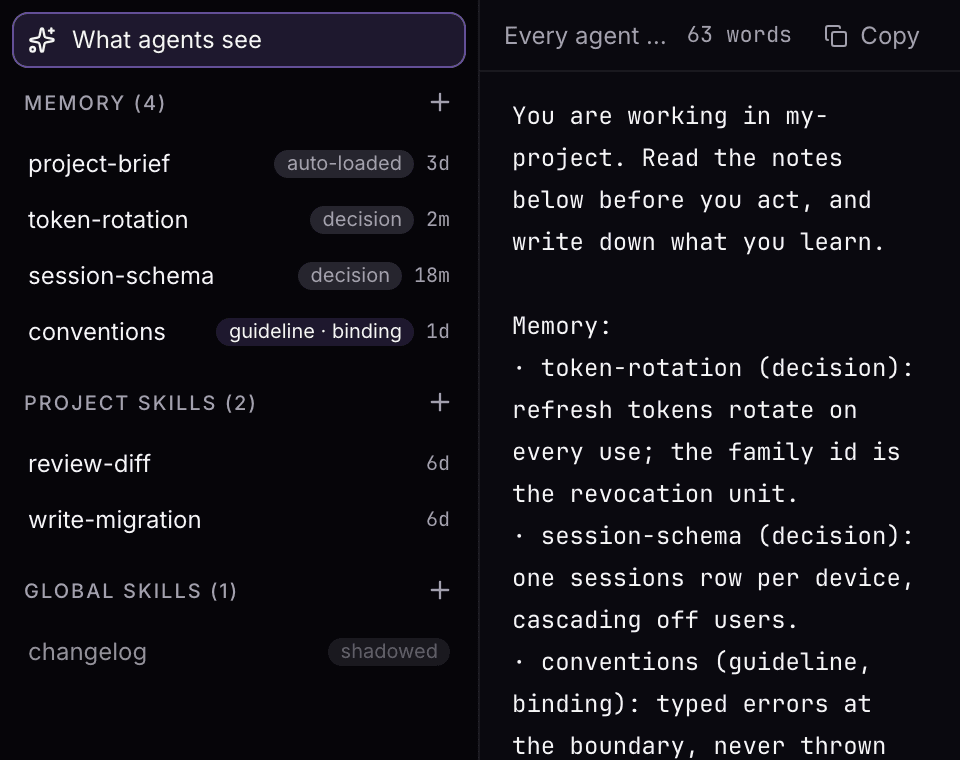
v0.1.4What one agent learns, the next one starts with
Findings go into a shared project memory, and anything worth repeating becomes a skill. Both are plain markdown in your repository, so they outlive the session, the machine, and the agent that wrote them.
An agent can also open a helper pane on a fresh branch, give it a first task, check what came back, and close it again. You just have to tell it to.
Integrated tools
Everything you'd leave the terminal for
Every workspace carries a tool drawer beside the panes. One click slides it open, and the things you would normally switch windows for are just there, next to your agents, looking at the same project.
v0.1.4MCP servers
Add server2 agents in this workspace need a restart to apply MCP changes.
Restart 2 agents- PlaywrightOn · global · 24 tools
- Context7On · global · 11 tools
- PostgresOn · this project · connecting…
- GitHubOff · global
Code editor
A real editor: file tree, tabs, Monaco underneath. Open what an agent changed and fix the small things yourself.
Browser
Preview what you're building without leaving. Agents can open pages in it, and read the console when you ask them to debug.
Git review
Every branch, who works on it, and the diff it would ship, uncommitted changes included. Merged branches clear in one click.
Knowledge
The shared memory and skills your agents read and write, browsable and editable. All of it is markdown in your repo.
MCP servers
Your MCP servers, toggled per project. Every agent in the workspace gets them, without per-agent setup.
Day to day
What running multiple agents actually needs
Know what every agent is doing
Every pane is in one of seven states, and that state shows in three places at once: the pane, the workspace rail, and the status bar. Whichever one you happen to be looking at, you get the same answer, and that includes workspaces in the background: an agent finishing or asking in a project you aren't looking at still reaches you.
An agent that finished while you were away stays marked until you look, and optional sounds can say it out loud.
idle. Nothing is running in this pane yet.
ready. The agent is up and waiting on you for a first instruction.
busy. Working. You do not have to watch it: the rail tells you when that changes.
needs input. A permission prompt or a question is blocking it. It stays amber until you answer, so it cannot get lost behind the ones that are still working.
finished. The task is done and nobody has looked at it yet. The mark stays filled until someone does.
stopped. The process exited, or you stopped it. Restart it from the pane menu or the palette.
error. The process died on its own. The pane keeps its output so you can read what happened.

The status bar keeps that count for the whole app, not just the workspace in front of you.
Make it yours
Full theme support, terminals and editor included: every theme paints the whole app, so nothing is left looking like it came from somewhere else. Try any of them:
VibeGuild Dark · dark · 20 built in, or write your own
macOS and Windows
One release and a shared code base for both platforms, so neither is the port that lags behind. Linux isn't supported yet.
Local by design
Your code, your prompts and everything your terminals print never pass through us: our servers hold your account and nothing else. Each agent talks to its own vendor directly, under the terms you already accepted with them. There is no copy of your work on our side to leak, subpoena, or train on.
Real terminals
A real terminal, not a box around an agent
Every pane is a full PTY, the same thing iTerm or Windows Terminal hands an agent. Colors, TUIs, keybindings and permission prompts behave exactly as they do there.
Which is why we stay out of the keyboard. ⌘K opens command mode the way tmux's prefix key does: press it, then one or two more keys. Every binding is yours to change, and the four below are the whole list we reserve. Everything else reaches your CLI untouched.
- ⌘1…9Jump straight to a pane focus-pane
- ⌘KCommand mode, the leader key leader
- ⌘⇧PThe palette, searchable by what you want palette
- ⌘FFind in the terminal you're looking at find
On Windows: Ctrl+1…9 · Ctrl+Shift+K · Ctrl+Shift+P · Ctrl+Shift+F
v0.1.4Common questions
What is VibeGuild?
An ADE (agentic development environment): a desktop app for vibe coding and for developers who put several AI agents to work on the same project, side by side in real terminals. The agents share awareness of the project and of each other, so they can work together.
I already use Claude Code. What does VibeGuild add?
Parallelism you can actually manage. Run several Claude Code sessions at once, or mix in Codex and others, each in its own pane on its own branch. You see who is working and who is waiting on you, you can ask one agent to hand its work to another, and what one learns is written down for the rest. One agent in one terminal can't do any of that.
Which agents work with VibeGuild?
Any AI coding agent with a CLI: Claude Code, Codex, Gemini CLI, OpenCode, Grok Build, Kimi, Qwen, Goose, or anything else that runs in a terminal. Plain shells are first-class panes too.
How is this different from tmux or a few terminal tabs?
Tabs and splits give you the panes. What they can't give you is the shared state: which agent is waiting on you, which branch each one is on, a project memory they all read, and a way to pass work from one agent to another. VibeGuild is a real terminal emulator that adds those, and tmux still works inside a pane if you want it.
Don't parallel agents step on each other?
Only if you want them sharing a checkout, and that's your choice per pane. A pane can take its own branch in a git worktree that VibeGuild creates and cleans up for you, so several agents edit the same repository at once without touching the same working copy. The git panel shows who is on which branch the whole time.
Does VibeGuild wrap or replace the agents?
It starts the agent's own CLI and then gets out of the way. There is no prompt of ours in front of yours, no rewriting of what you type, and no model of ours in the loop. VibeGuild hosts your agents; it never speaks for them.
Do I need new API keys?
No. Agents run under the subscriptions and API keys you already have. Your existing plans do the work.
Why bring my own subscriptions?
AI subscriptions are heavily subsidized: a flat monthly plan buys far more usage than the same money spent on API credits, and it's the CLI agents that unlock it. That's a big part of why VibeGuild runs the real CLIs rather than calling models itself: the usage you already pay for is the usage you get.
What does it cost?
It's free during the private beta, and you bring your own agent subscriptions. Paid plans come later.
Have an invite code?
Create your account in a minute and open your first workspace.
Get startedNo invite yet? Write us at support@vibeguild.ai. We onboard in small batches.